
Why We Built XYWORKS.PRO – A Designer's Path to CAD/CAM Software
How a product designer's frustration with desktop CAD/CAM tools led to building a browser-based platform for CNC fabrication shops. The XYWORKS.PRO origin story.
# Why We Built XYWORKS.PRO — And What It Means for Manufacturing
## The Problem Nobody Was Solving
I've spent 12+ years designing products — consumer goods, industrial automation systems, Defense Department projects, things that get CNC-machined, laser-cut, 3D-printed, and injection-molded. I've used every major CAD package. And for most of that time, the workflow from "finished design" to "parts on the machine" looked the same:
Export a DXF. Open a separate CAM program. Configure toolpaths. Generate G-code. Open a nesting tool. Arrange parts on a sheet. Open a quoting spreadsheet. Estimate cost. Open a job tracker. Log it. Email the files to the shop floor.
Five tools. None of them talk to each other. Every one of them costs money — sometimes thousands per seat per year. And if your machinist on the shop floor needs to check a dimension? They'd better have a CAD license too, or they're squinting at a PDF.
This isn't a niche complaint. Every fabrication shop I've worked with — plasma cutters, laser shops, waterjet operations, CNC routers — runs some version of this fragmented workflow. And most of them are small businesses that can't afford $5,000/year per seat for software that only does one thing.
## The Moment I Decided to Build It
It wasn't a single moment. It was a slow build of frustration over years of watching shop owners toggle between six browser tabs, a desktop app from 2008, and a paper printout taped to the machine.
But the tipping point was a project where I needed to deliver customizable cellar trap doors — each one a different size, with different glass panels, different frame configurations. Every order required re-doing the DXF, re-nesting the parts, re-generating the G-code, and re-quoting the job. For what was essentially the same design with different dimensions.
I thought: What if the design could reconfigure itself? What if the CAM setup, the nesting, and the G-code all updated automatically when you changed one number?
That question became XYWORKS.PRO.
## What We Built
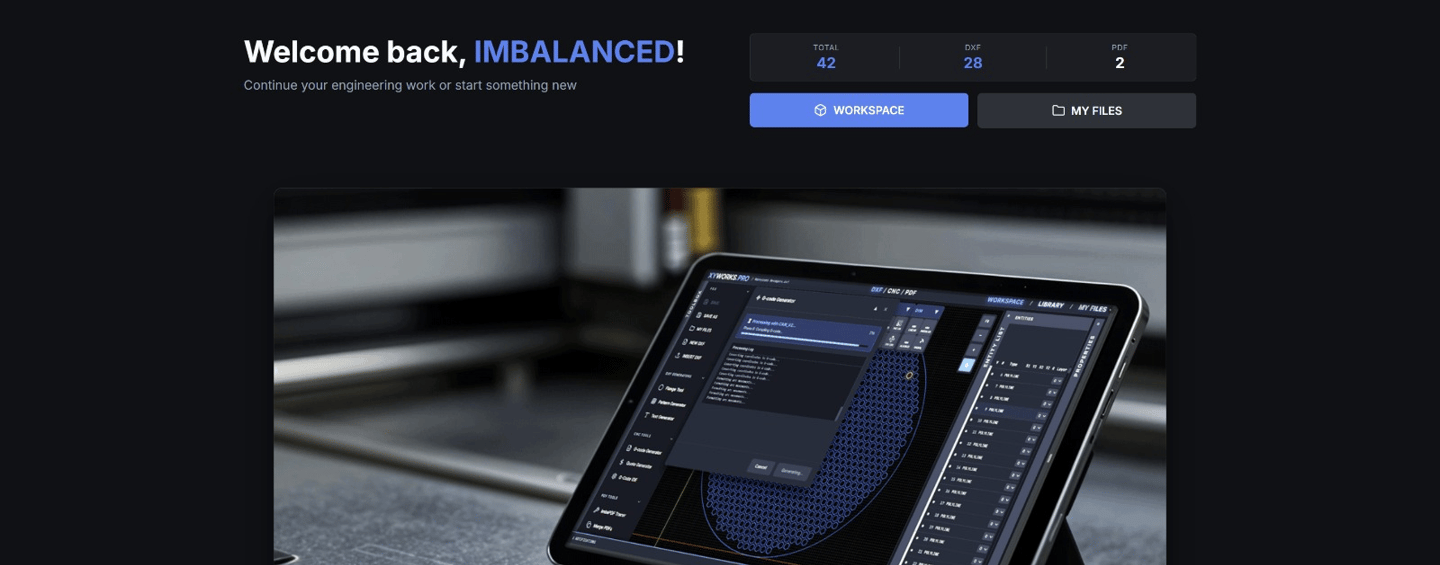
XYWORKS.PRO is a browser-based CAD/CAM platform. No installs. No plugins. Works on desktop, tablet, and mobile. Here's what it does:
DXF Editing & Design — Open, edit, and create DXF files directly in the browser. Layers, snapping, precision tools — the things you actually need on the shop floor.
CAM Setup — Material-specific parameters, tool configurations, feed rates, kerf compensation. Set it once per material, use it forever.
G-code Generation — Live toolpath simulation with speed, direction, and kerf preview. You see exactly what the machine will do before you hit start. Entry/exit strategies, lead-in optimization, all configurable per material and machine.
Automated Nesting — Drop your parts on a sheet, let the algorithm pack them. Material utilization numbers, cut time estimates, cost per part.
Job Tracking & Shop Management — From quote to cut to delivery. No more spreadsheets.
PDF Tools & Raster-to-Vector — Annotate shop drawings, convert scanned sketches to editable vectors. The random things shops actually need every day.
Free tier available. Because the shop owner running a 3-person operation shouldn't need to justify a software purchase to try something new.
## Why Browser-Based Matters
I could have built another desktop application. It would have been easier in some ways. But desktop apps are why the problem exists in the first place:
Licensing nightmares. One seat costs X. Your machinist needs it too. Now it costs 2X. Your estimator? 3X.
Update friction. Push an update, hope everyone installs it, debug the one machine still running Windows 7.
Device lock-in. Your CAM software runs on the office PC. Your CNC machine is on the shop floor. Good luck.
A browser-based platform means anyone on your team can access it from any device. The machinist checks a dimension on a tablet mounted to the machine. The estimator runs a quote from their laptop. The owner reviews jobs from their phone. Same data, same tool, no installs.
## What This Means for Manufacturing
XYWORKS.PRO started as a tool I needed for my own design work. But it turned into something bigger: proof that manufacturing software doesn't have to be expensive, fragmented, or stuck on a desktop.
Small and mid-size fabrication shops — the backbone of manufacturing — deserve tools built for how they actually work. Not scaled-down versions of enterprise software. Not tools designed by people who've never stood next to a CNC machine.
We're also using the same technology stack to build custom solutions for individual shops and manufacturers through our Digital Tooling service at Design Studio IMBALANCED. If a shop has a specific workflow bottleneck — a quoting process that takes too long, a product family that requires manual re-drawing for every order, a nesting step that wastes material — we can automate it.
If we can build an entire CAD/CAM platform from scratch, we can automate your specific workflow.
## Try It
XYWORKS.PRO is live. Free tier, no credit card required.
Have a manufacturing workflow you want automated? → Contact Design Studio IMBALANCED (designimba.com/contact)
Stojan Jankovic is the founder of Design Studio IMBALANCED and creator of XYWORKS.PRO.
He's been designing products and building manufacturing tools for over 12 years.